

The check engine light came on in my 2012 F-150 on a Tuesday afternoon, about three miles from home. I did what I have done for the better part of 30 years: I pulled into the driveway, popped the hood, and stared at the engine like it owed me money. That never tells you anything. What finally tells you something is a scanner, and the one I keep reaching for is the ANCEL AD310.
If you have never used an OBD2 scanner, the whole thing can feel like a mystery. You plug it in, a code appears, and you have no idea what it means or what to do next. I am going to walk you through the exact steps I use, from finding the port to clearing the code, so the next time that light comes on you are not guessing.
The scanner I keep in the truck for exactly this moment
The ANCEL AD310 reads and clears engine codes on any 1996 or newer vehicle with an OBD2 port. No apps, no pairing, no subscription. Plug it in, read the code, look it up, fix the problem, clear the light.
Amazon Check Today's Price on Amazon →Step 1: Find the OBD2 port and plug in the ANCEL AD310
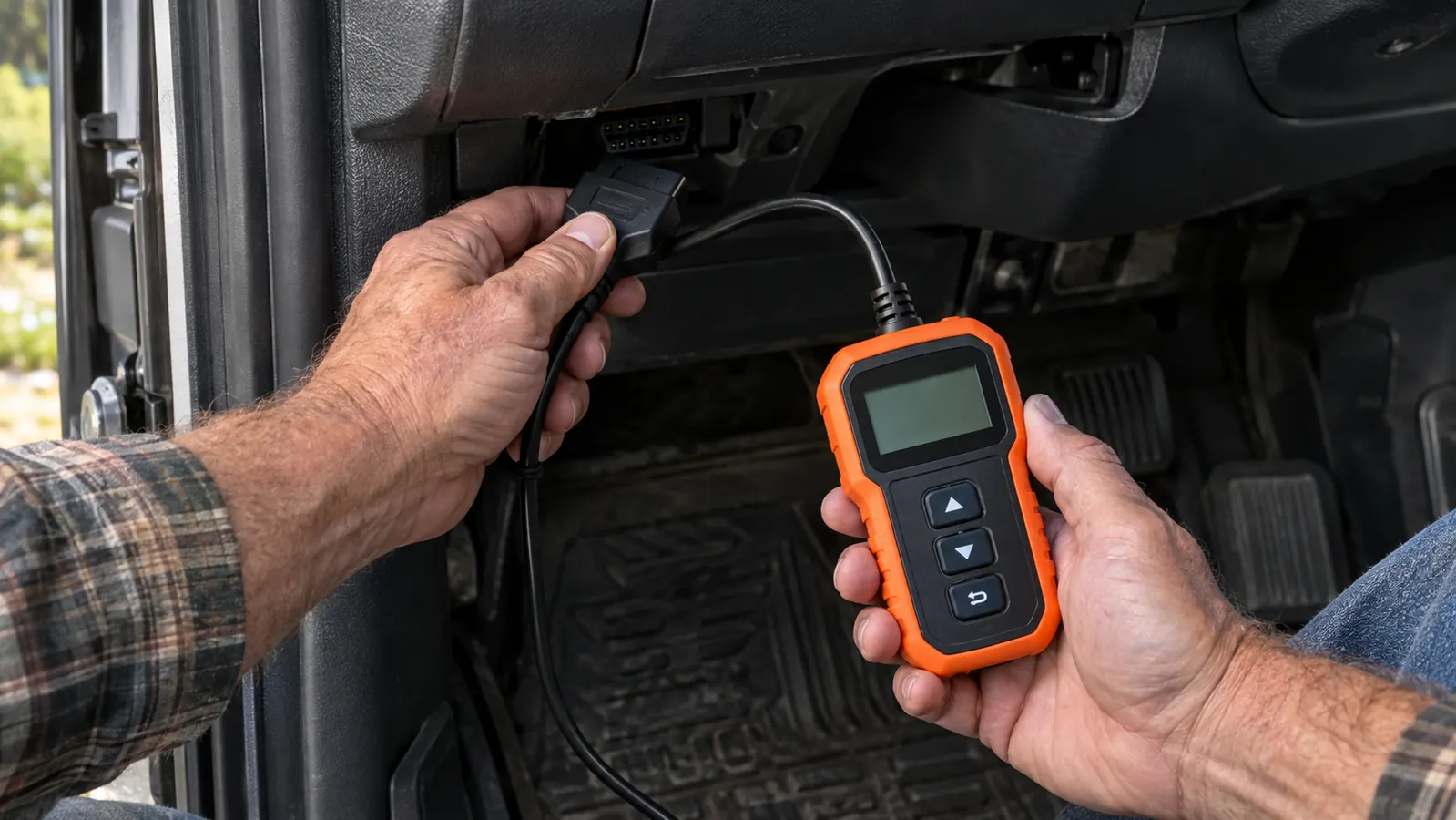
The diagnostic port is almost always under the dashboard on the driver's side, within a foot or two of the steering column. On my F-150 it is right above the hood release, tucked up under the dash so I have to reach in a little to get to it. On some cars it is behind a small plastic cover, and on a few it is hidden so well you have to feel around for it. It is a trapezoid-shaped connector with 16 pins, and it is the only thing that shape under there, so once you know what you are looking for you will spot it fast.
With the engine off, plug the ANCEL AD310 into the port. The connector only goes in one way, and it seats with a solid click. The scanner screen lights up as soon as it makes contact because it draws power straight from the vehicle. You do not need to turn the key on yet, but you do need the ignition in the run position before the scanner can talk to the computer. I usually turn the key to the run position without starting the engine, which is the second click on most vehicles.
One thing I will tell you from experience: if the scanner will not power on, check the fuse for the cigarette lighter or the accessory port first. On a lot of vehicles the OBD2 port shares that circuit, and a blown fuse will leave you with a dead scanner and a light that is still on. I had that happen once on a neighbor's sedan, and I chased it for twenty minutes before I thought to check the fuse box. It was a 15 amp fuse, and it cost about a dollar at the parts store.
Step 2: Read the code
Once the ignition is in the run position, the ANCEL AD310 runs a quick self-check and then shows a menu. You want the Read Codes option, which is usually the first thing on the screen. Press the button to select it, and within a few seconds the scanner will pull any stored codes from the engine computer. On my truck it took maybe four seconds the first time, and I remember thinking that it was a lot faster than I expected.
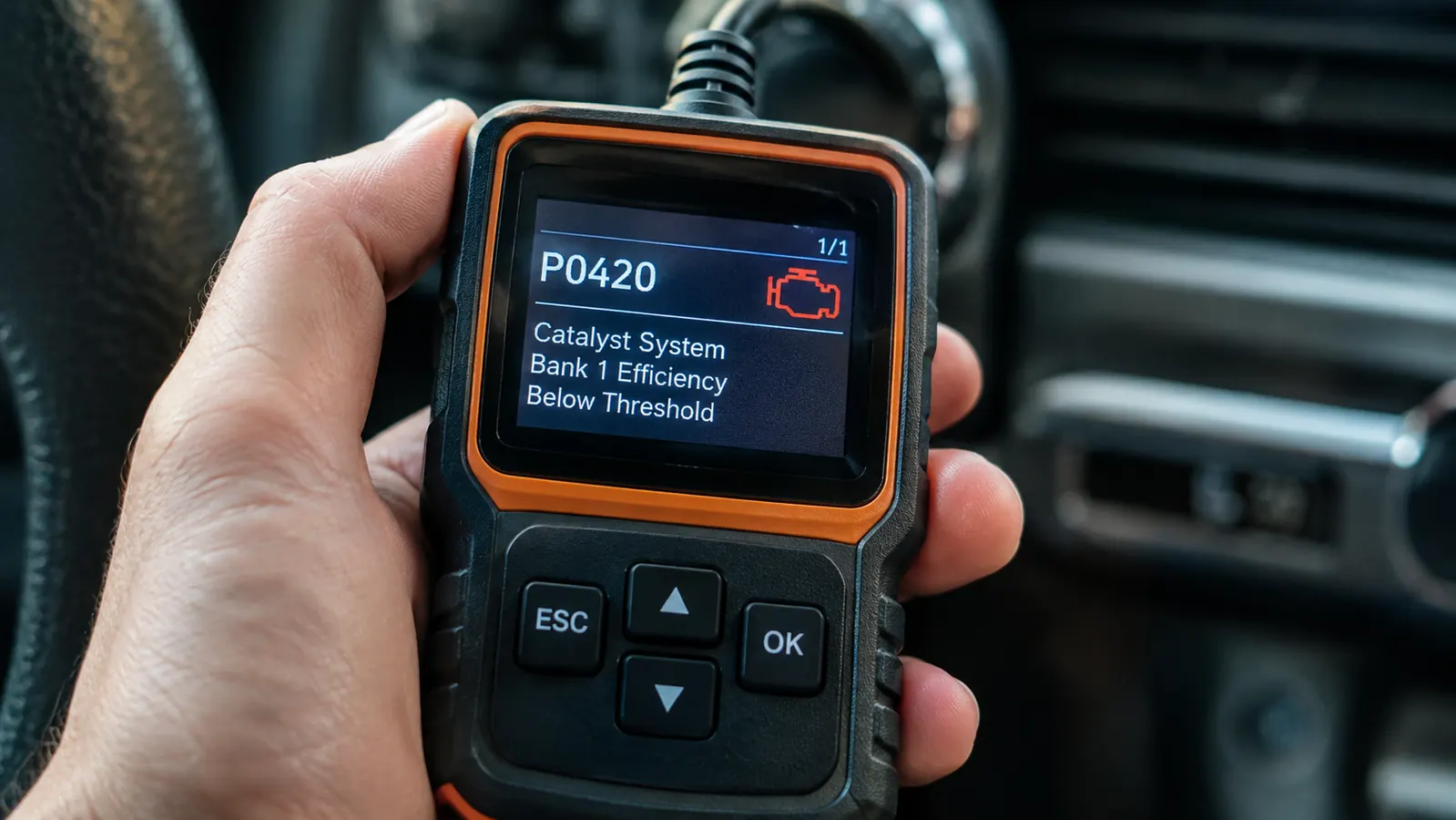
The code will look like a letter followed by four numbers, something like P0301 or P0420. The letter tells you which system the code belongs to. P codes are powertrain codes, which covers the engine, transmission, and emissions. That is what you will see for the vast majority of check engine lights. B codes are body, C codes are chassis, and U codes are network or communication related.
Write the code down. I keep a small notebook in the tool chest for exactly this, because you will need the exact code when you look it up. Do not rely on your memory, and do not clear the code before you have written it down. I have made that mistake once, and once was enough. I cleared a P0442 without writing it down, and then spent a week wondering whether the gas cap was actually the problem or whether I had missed something else. The gas cap was the problem, but I could not be sure of it until the light came back and I read the same code a second time.
Codes come in a few types, and it helps to know what you are looking at. A code that starts with P is a powertrain code, which covers the engine and emissions systems, and that is what the ANCEL AD310 is built to read. A P0 code is a generic code that means the same thing on every make. A P1 code is specific to the manufacturer, so look it up with your make and model. If the scanner shows a pending code, the computer has seen a problem once but has not confirmed it yet, so keep an eye on it.
Step 3: Look up what the code means
The ANCEL AD310 will show a short description of the code on its screen, but that description is just the starting point. P0301, for example, will read something like Cylinder 1 Misfire. That tells you which cylinder is misfiring, but it does not tell you whether the problem is a bad spark plug, a bad coil, a vacuum leak, or a fuel issue. That is where the real diagnosis begins.
I look up the code online and read a few sources before I buy any parts. A forum post from someone with the same engine is worth more than a generic parts store description. Pay attention to the most common causes for your specific make and model, and start with the cheapest and easiest fix first. For a misfire code, that usually means checking the spark plugs and the ignition coil for that cylinder before you start replacing sensors.
This is the step where the scanner pays for itself. A shop will charge you an hour of labor just to read the code and tell you what it means. With the ANCEL AD310, you have the same information in your driveway in about two minutes, and you can decide whether the fix is something you want to tackle yourself. Last spring, that P0301 on my truck turned out to be a cracked spark plug boot. A twenty dollar part and an hour on a Saturday morning, and the light has not come back since. I pulled the coil, saw the crack running down the side of the boot, and knew I had found it before I even ordered the part.
Step 4: Fix the problem, then clear the code
Once you have fixed the problem, you can clear the code with the ANCEL AD310 and see whether the light stays off. From the main menu, select Erase Codes or Clear Codes, confirm that you want to do it, and the scanner will clear the stored codes and turn off the check engine light. It takes about five seconds.
Here is the part a lot of people get wrong: clearing the code is not the same as fixing the problem. If you clear a code and the light comes back within a day or two, the problem is still there. The scanner is a tool for diagnosis, not a magic eraser. I have seen people clear a code, trade the truck in, and feel like they got away with something. The light will come back for the next owner, and it will come back for you too if the underlying issue is still there.
After you clear a code, drive the vehicle for a few days. Some codes will not come back immediately even if the problem is still present, because the computer needs to see the fault happen again under certain conditions. If the light stays off for a week of normal driving, there is a good chance the fix actually took. On my truck, I cleared the misfire code on a Saturday, drove it to church on Sunday and to work all week, and the light stayed off. That is the confirmation I look for.
Step 5: Know when to stop and call a professional
The ANCEL AD310 is a code reader, not a full diagnostic tool. It will read and clear engine codes, and it will show you the code descriptions, but it will not give you live data streams, ABS codes, or the kind of deep module information that a professional scan tool provides. That is fine. For the vast majority of check engine lights, a code reader is all you need to make a smart decision.
There are also times when you should stop before you start. If the check engine light is flashing, that means the engine is actively misfiring in a way that can damage the catalytic converter. Do not drive it. Pull over, shut it off, and have it towed. A flashing light is an emergency, and no scanner is going to change that.
If you read the code, look it up, and the fix involves something you are not comfortable with, there is no shame in taking it to a shop. The scanner still did its job. You walked in knowing the code, knowing the likely causes, and knowing roughly what the repair should cost. That alone will save you from being talked into work you do not need.
What Else Helps
A code reader is the starting point, but a few other things make the job easier. A cheap digital multimeter helps you check sensors and grounds when you are chasing an electrical problem. A set of basic hand tools covers most of the fixes a code will point you toward, from spark plugs to oxygen sensors. And a notebook, or even the notes app on your phone, is worth more than you would think. Write down the code, the date, the mileage, and what you did. The next time the same code appears, you will know exactly where to start.
I will also say this: keep the ANCEL AD310 in the truck, not in the garage. It is small enough to live in the glove box or under the seat, and the day you need it is usually the day you are somewhere else. I have used mine in a grocery store parking lot to read a neighbor's sedan, and I have loaned it to my brother-in-law more times than I can count. It is the kind of tool that is only useful if it is within reach.
A shop will charge you an hour of labor just to read the code. With the ANCEL AD310, you have the same information in your driveway in about two minutes.
Put one in the truck before the light comes on
The ANCEL AD310 is a straightforward OBD2 code reader that pays for itself the first time you use it. No subscription, no app, no learning curve. Plug it in, read the code, and decide what to do next with your own eyes.
Amazon Check Today's Price on Amazon →